DECstation 220 Now Getting Corrupted Video

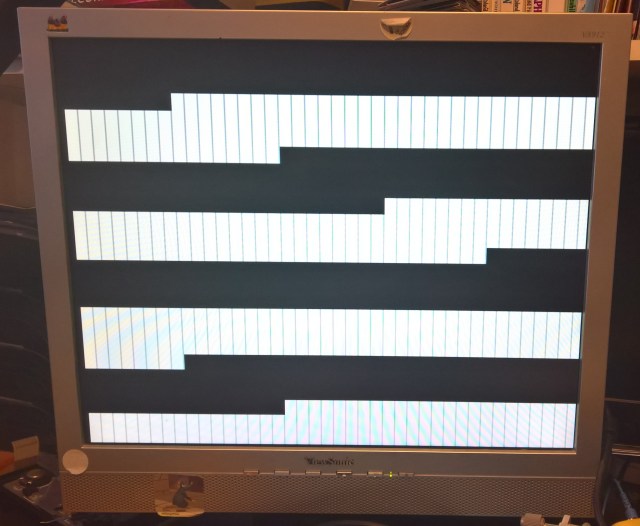
I spent a bit of time today going over the leak-damaged area of the DECstation 220 looking for damaged tracks. I found a few pins on some of the chips that seemed to be disconnected and fixed them. In doing so the beep on startup has become intermittent, but I now get a video signal!

Video Pattern

Pattern now displayed by the DECstation 220

I believe patterns like this usually indicate some kind of memory problem. So I checked the DRAM and the Video RAM. The DRAM sees some write activity right after powering on the machine, but then the activity stops. For some reason the Paradise VGA chip never seems to write anything to the Video RAM.

Posted in Retro-Computing | Tagged | 1 Comment

DECstation 220

Some time ago I collected a DECstation 220. This is the machine that succeeded the Rainbow. It uses an Intel 80286 processor and is DOS compatible. Mine, being a European version, has Olivetti parts inside.

The person I got it from used it networked to a MicroVAX 2000, apparently booting it off the MicroVAX 2000 using an early version of Pathworks called PCSA. He actually had two of these machines, he stripped one of them for parts and kept them as spares, disposing of the case. Very forward thinking.

My first attempt at powering it did bring up a screen of self test diagnostics, although it only appeared after a while. It displayed a pass for CPU, ROM, Memory Refresh and Keyboard Controller, but then it hung. I power cycled it but got nothing further out of it. When I opened it up I found some serious battery leakage had occurred.
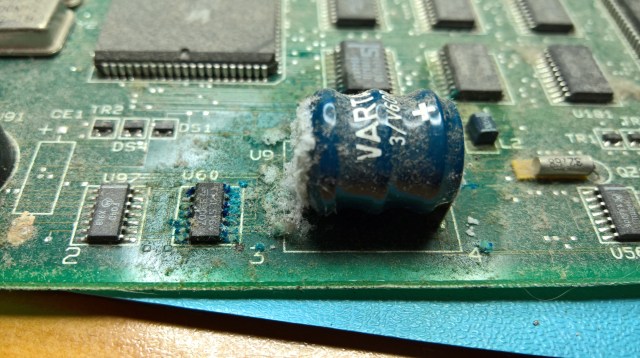
DECstation 220 Battery Leakage

I removed the battery and cleaned it all up, using a little bit of lemon juice to get rid of some of the blue stuff that would not otherwise come away. The result was this:
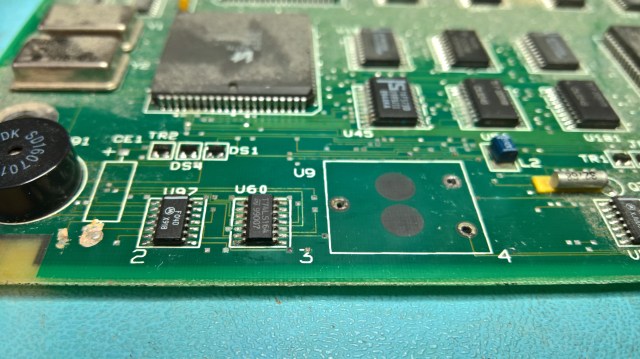
DECstation 220 Cleaned Up

I have since bought a new battery and installed it, although I know a lot of people think that batteries should not be replaced as they will leak one day too. However, the clean-up did not resolve the problem, the leakage had done damage. The spare board also had leakage, which didn’t seem so bad, I cleaned that up too, but it didn’t work either.

I was at the point where there were no beeps, there was no video signal and the keyboard lights would come on and stay on. I put it away for a while and came back to it again recently, with a view possibly to passing it on to someone else. The trouble is I find it difficult to let a problem like this go. So I got my logic analyser out and found that the 80286 was getting a RESET every 10us. I then realised that the BIOS ROM Output Enable (OE) signal, which is active low, was never going low enough (it went to no less than 1.8V). I found that a transceiver driving the OE signal was being told to do the wrong thing. I eventually traced this to the battery damaged area where a damaged track was preventing a 74F04 (marked U97) from connecting to the transceiver. I soldered a patch wire in place (badly, I am not good at this). After I did this I found that the ROM OE signal was driven correctly and the ROM started showing sensible activity and the RESETs stopped.

This did not fix it though. There were still no beeps and no video output. I think at this point the BIOS was running but in a loop waiting for something to happen that didn’t happen.

More probing with the oscilloscope showed that another chip in the leak damaged area was behaving oddly, the signal was “blurry” and it looked like a grounding problem. In fact I found that the GND pin was not connected to GND on other chips. I tacked a patch wire to ground the chip.

Now when I applied power I got a beep, and the keyboard lights would also go out rather than stay on. But there was still no video signal.

I once again got the oscilloscope out and checked other chips in the damaged area for odd signals. I found a 74F573 (U45) that had inactive outputs when the inputs were active, and that were active on the spare motherboard. So I replaced that, in doing so I damaged a pad and had to add yet another patch wire. This did not change the result.

I found that another chip was behaving oddly too in the damaged area. This was a 74LS164 shift register (U60). It’s clock was permanently high, I struggled to trace its source, so I just went ahead and replaced it. However, I later traced its clock to a parallel output on an Intel 8742, so I think it may be related to the keyboard control, which I would expect to show up as a keyboard error in the POST. So I don’t think this is the problem.

However I noticed some odd signals on the data pins of the 8742, which after passing through multiple 74LS125 transceivers came to be connected to the data pins of the 80286. I could not tell though if the signals were coming from the 80286 or going to it. I don’t really know whether a signal like the one below is normal or not. Update: The display is 2V/div and the timebase is about 0.1us/div (can’t actually remember), the input was set to DC. The probe was set to 10x in order to keep its effects on the signal down.
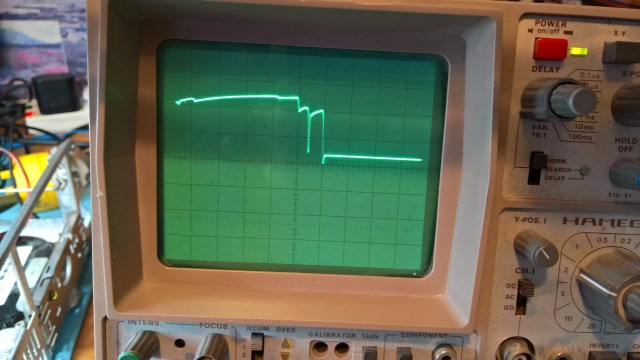
DECstation 220 Data Signals

This is where I am up to. I am now a bit stuck and I will ask on the classiccmp mailing list for advice.

Update: Some responses I got suggested it may just be transmission line effects and/or periods of bus idle, although I didn’t give enough information about how the oscilloscope was set to allow reasoned interpretation. I think the next step would have to be to use the logic analyser to get an address trace, match that to the ROM dump I have, and try to work out what the BIOS is doing. But I am not sure I have the enthusiasm to do all that work.


Posted in Retro-Computing | Tagged | 1 Comment

DECstation 5000/240 Progress

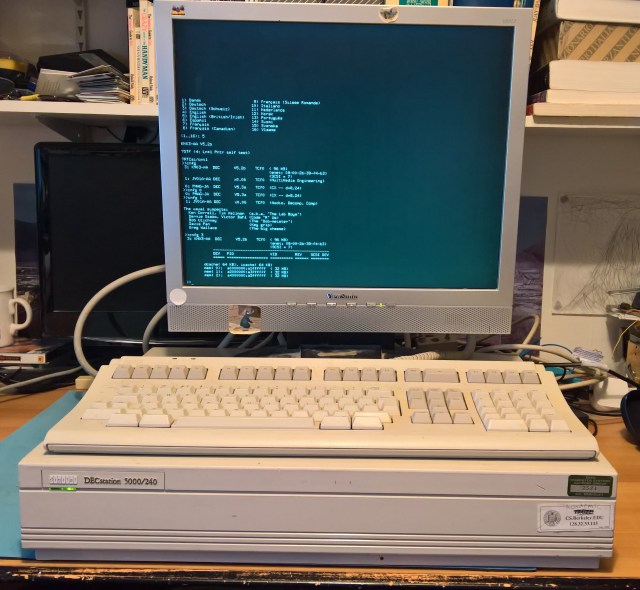
DECstation 5000-240 Operating

I have made a lot of progress in getting my newly acquired DECstation 5000/240 going again. Before doing anything I took it apart and opened up the power supply to inspect the electrolytic capacitors. They all looked fine. I then removed everything I could from the machine, including the CPU daughter card, and powered it up. The fans turned, which was good, and I checked the ripple with my oscilloscope. So the power supply looked fine.

I put back the CPU and one memory board, leaving everything else out, including the video controller. I connected a terminal emulator to the 3rd port for the alternate terminal and powered it up. I got nothing on the terminal, and the diagnostic LEDs all lit up and stayed lit. That was not a good sign. The one good thing was that the two green LEDs on the CPU daughter card lit up, which is supposed to indicate that it has established communications (with what I am not sure).

There followed a lot of messing around, trying the different jumpers, swapping the memory board, adding the video controller, reseating the EEPROM, nothing worked. Then I tried gently rocking the CPU daughter card in its socket. That worked. Hopefully it was just not seated well, and not a sign of some bad joints.

At that point I got the following output:

KN03-AA V5.2b
3/misc/kbd
?STF (4: Ln#0 Kbd self test)

3/misc/mouse
?STF (4: Ln#1 Pntr self test)

?RTCsi/cntl
>>

So, it was rightly complaining that there was no keyboard and no mouse. It was also complaining that the real-time clock was not working, this will be the battery in the Dallas chip that has expired.

Unfortunately, I couldn’t enter commands via the terminal emulator. This is usually a problem with the combination of how the PC serial port works and the various intervening connectors to get to the port on the machine. I fiddled around with connectors for a bit. While doing this the machine suddenly powered down, after being on for perhaps an hour. I only got it back after unplugging the power cord. I have no idea what caused this. It happened again later when I put the whole system back together again to take the photograph of it working.

I decided not to bother investigating the serial port for now and just went to find the proper keyboard cable and a DMAG monitor cable to connect to my sync-on-green LCD monitor. Once I could enter commands I entered the cnfg command and got output similar to the following (re-typed)

3: KN03-AA    DEC  V5.2b     TCF0  (32MB)
                                   (enet: 08-00-2b-39-f4-b3)
                                   (SCSI = 7)
0: PMAG-JA    DEC  V5.3a     TCF0  (CX 00 d=8,24)

So it looks like I have a 32MB module, which is great! I found that I have three 32MB modules and two 8MB modules. Unfortunately it seems you can’t mix them.

I then installed the other options. The TURBOchannel Extender did not show up in the output of the cnfg command. I am not sure if that is normal or not.

I have saved the most intriguing item for the last bit of this post. The mystery option turns out to be some kind of experimental video board. It contains an FPGA and a large C-Cube chip. When I use the cnfg command to get the summary configuration it says

1: JV01A-AA    DEC    x0.06     TCF0 (MultiMedia Engineering)

When I use the cnfg command to get the details about it I get the following:

1: JV01A-AA    DEC    x0.06     TCF0 (Audio, Decomp, Comp)
The usual suspects:
  Ken Correll, Tim Hellman  (a.k.a. ‘The Lab Boys’)
  Bernie Szabo, Victor Bahl (Code ‘R’ Us)
  Bob Ulichney              (Key grip)
  Greg Wallace              (The big cheese)

Someone on the classiccmp email list told me that it is probably a Jvideo board, a prototype built by DEC SRC for the J300 series of video and audio adapters. He pointed me to the Digital Technical Journal, Volume 7, Number 4; in fact two of the people mentioned above authored one of the papers. One of them also wrote further articles on video rendering and video conferencing in Volume 5, Number 2.

Here are some pictures of the board:

Posted in DECstation 5000/240, Retro-Computing | Tagged | Leave a comment

DECstation 5000/240

I am very excited that today I finally received a DECstation 5000/240 that was shipped to me from California along with a TURBOchannel extender (although there was no cable, so I need to find one of those). I used to have one of these before, but I swapped it for a MicroVAX 3100 Model 95 and regretted it ever since.

The machine came from a company called Mesa Electronics; in May 2017 someone from the company said it was moving and needed to clear out a load of old equipment. A very kind individual in the area picked up the machine and sent it to me as the people at Mesa Electronics were just too busy moving to be able to think about shipping things abroad. They also had a faster model 260, and a DECtalk DTC01, but sadly I missed out on those; I have been looking for this model of DECtalk for a long time as I remember playing with one at an exhibition in Milan in mid 1980s.

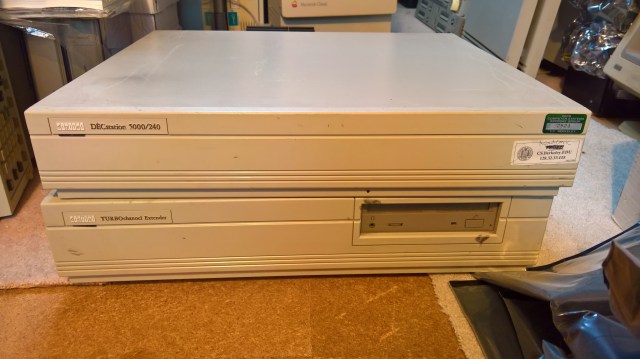
It came with a TURBOchannel extender (no cable though), and a bunch of other cards. Here are the two machines:

DECstation 5000-240 and TcE

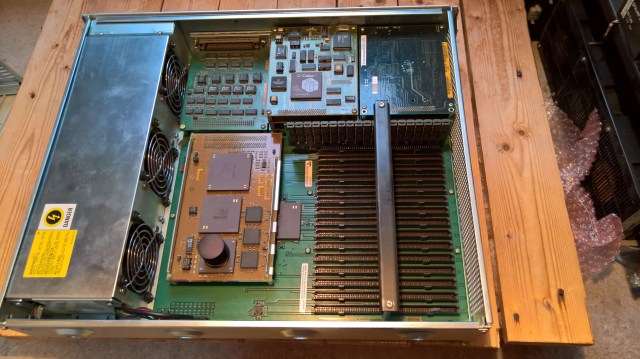
The DECstation 5000/240 was immaculately clean inside. It came with:

  1. 1 memory board (size unknown).
  2. PMAGB video controller.
  3. Some kind of video capture board (?).
  4. A TURBOchannel Extender module (installed for shipping only).

Here it is inside:

DECstation 5000 Inside

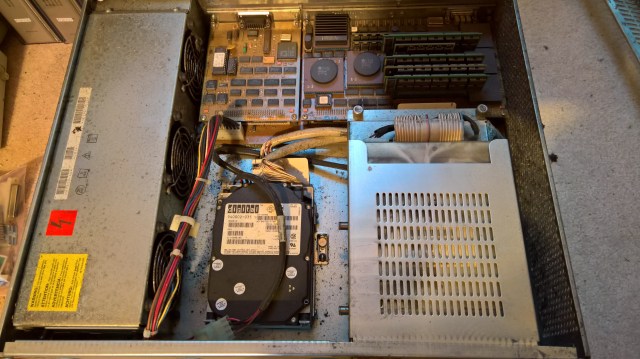
The TURBOchannel Extender was filthy inside and also slightly rusting. It came with:

  1. PMAG-D video controller which has been marked as upgraded to PMAG-E.
  2. RRD42 CD-ROM.
  3. 2x RZ25-E hard disk (426MB).
  4. PMAD Ethernet controller (installed for shipping only).

This is it inside:

TURBOchannel Extender Inside

I also got a bunch of spare boards:

  1. 3x PMAG-C video controller (with a memory board).
  2. PMAZ-A SCSI controller.
  3. PMAD-A Ethernet controller.
  4. 2x PMAG-D video controller (with a memory board).
  5. 2x DEFZA FDDI controller.
  6. 4x memory board (size unknown).
  7. A bunch of terminators and Ethernet transceivers

Over the coming days I will check the machines over carefully, make sure the power supplies are working OK and then see about getting them running. I think I still have the disk that I used to run my first 240, so hopefully if everything works I will have it up and running quickly, although I won’t be able to make use of the Extender until I can get a cable.


Posted in DECstation 5000/240, Retro-Computing | Tagged | Leave a comment

Rejuvenating This Site

For some time now I have been thinking of updating this site, and actually documenting more about my collection. The impetus came recently after I started working on an emulator for MU5 and I needed a home for information about it. I finally bought a domain name and now I have started updating my old site.

Posted in Retro-Computing | Tagged | Leave a comment

RetroChallenge 2012 – Designated Router

Did the work tonight to make the router become the Designated Router and send the Ethernet Router Hello message to the All End Nodes address when it is the designated router, and to stop doing so if it stops being the designated router because an adjacency in the same area gets a higher priority. To make this work I had to fix a bug in the timer code so that a timer callback can create new timers itself.

So I have reached the point where all but one feature of the Ethernet Initialization Sublayer is implemented. The one bit that is still missing is the clean closing down (section 9.1.4 of the Routing 2.0 spec).

Posted in Uncategorized | 2 Comments

RetroChallenge 2012 – Refactoring

I have been away a bit and not had my development environment available to carry on, so I decided to do some refactoring and attempt some other small but important changes while I was away. The changes were to add recognition of padding, so I can read Ethernet Router Hello messages from RSX too.

Of course when I got back home, I found I had broken the code and it took me a while to fix it.

Also made a start on the designated router logic but I really need to create a proper initialization layer to do that right.

I still need to fix my Network Monitor parser for DECnet to deal with padding too.

Posted in Uncategorized | Leave a comment

Retrochallenge 2012 – Adjacency Staying Up

I have been cleaning up the code and checking the specification for the Ethernet Router Hello message to make sure I have implemented it fully. In doing so I realised that I was not setting the router information in the router list correctly to indicate that I had established two-way communication with the routers that had sent Ethernet Router Hello messages to me. This is why the simulated VAX780 was immediately saying that the adjacency was down after saying it was up. Now that I am reporting the status and priority correctly the 780 says the adjacency is up and it stays up.

Posted in Uncategorized | Leave a comment

Retrochallenge 2012 – Adjacency Up

I have been working on the Ethernet Router Hello message. After fixing some problems with the lengths I was putting in the message I finally worked out why my simulated VAX780 was not “seeing” my router node. It was because I was not sending the packets to the All Routers address. Once I fixed this and processed the Ethernet Router Hello messages I received, I got this message on my simulated VAX780:

%%%%%%%%%%%  OPCOM   4-JUL-2012 21:31:02.94  %%%%%%%%%%%
Message from user DECNET
DECnet event 4.15, adjacency up
From node 5.8 (VAX780),  4-JUL-2012 21:31:02.83
Circuit UNA-0, Adjacent node = 5.99

Of course, nothing else works at the moment, I get a timeout shortly after because I don’t implement anything else. Next step is to make the code a bit more robust, there are some hard coded bits and I haven’t tried it on the Raspberry Pi recently, so I need to work in those areas for a bit now. Then I can move on to implement more parts of the protocol.


Posted in Uncategorized | Leave a comment

Retrochallenge 2012 – Getting Started

After thinking about it many times, I thought this time around I would enter RetroChallenge. My project is probably going to be a bit longer than the month allowed and I am not sure how much time I am going to have to dedicate to it this month, but here goes.

The idea is to write a portable DECnet router that can be used on HECnet. My aim is to write it for Windows (as a Windows service) and as a daemon for Debian on a Raspberry Pi. At the moment I run a SIMH emulation of the VAX780 for this purpose and that means that anytime the machine it is running on is shutdown I have to go and restart SIMH. With a service or daemon I won’t need to do that anymore. Writing my own means I should be able to interoperate with Johnny’s HECnet bridge, and also real CISCO routers. I may be able to connect to other types of interface too, for example async hosts using DDCMP.

So far I have created a shell for the service and the daemon and I have created a bit of infrastructure to allow me to talk transparently to different interfaces (LIBPCAP for the LAN and sockets for the HECnet bridge at the moment). This bit is currently working on both Windows and the Raspberry Pi.

I am writing this in C for maximum portability, so I am using function pointers to implement my own inheritance mechanism to make multi-interface support easier. My task at the moment is to get the Ethernet Router Hello message working to the point that other nodes recognise my router. I am sending out my node’s hello message, but it isn’t being acknowledged by my emulated VAX780 yet.

Posted in Uncategorized | Leave a comment